Binary Search: Learn Algorithm with JavaScript
Learn Algorithm: 2. Binary Search
Hi, I’m Ibrahim Sifat, a Frontend Engineer and Full Stack Developer based in Jeddah, Saudi Arabia. I specialize in building scalable web applications with React, Next.js, and Laravel. With over 4 years of experience, I love creating user-friendly designs, optimizing performance, and solving complex problems. Let’s build something great together!
Conditions for when to apply Binary Search in a Data Structure:
To apply the Binary Search algorithm:
The data structure must be sorted.
Access to any element of the data structure takes constant time.

Compare the middle element of the search space with the key.
If the key is found in the middle element, the process is terminated.
If the key is not found in the middle element, choose which half will be used as the next search space.
If the key is smaller than the middle element, then the left side is used for the next search.
If the key is larger than the middle element, then the right side is used for the next search.
This process is continued until the key is found or the total search space is exhausted.
The Binary Search Algorithm can be implemented in the following two ways
Iterative Binary Search Algorithm
Recursive Binary Search Algorithm
Iterative Binary Search Algorithm:
How does Iterative Binary Search work?
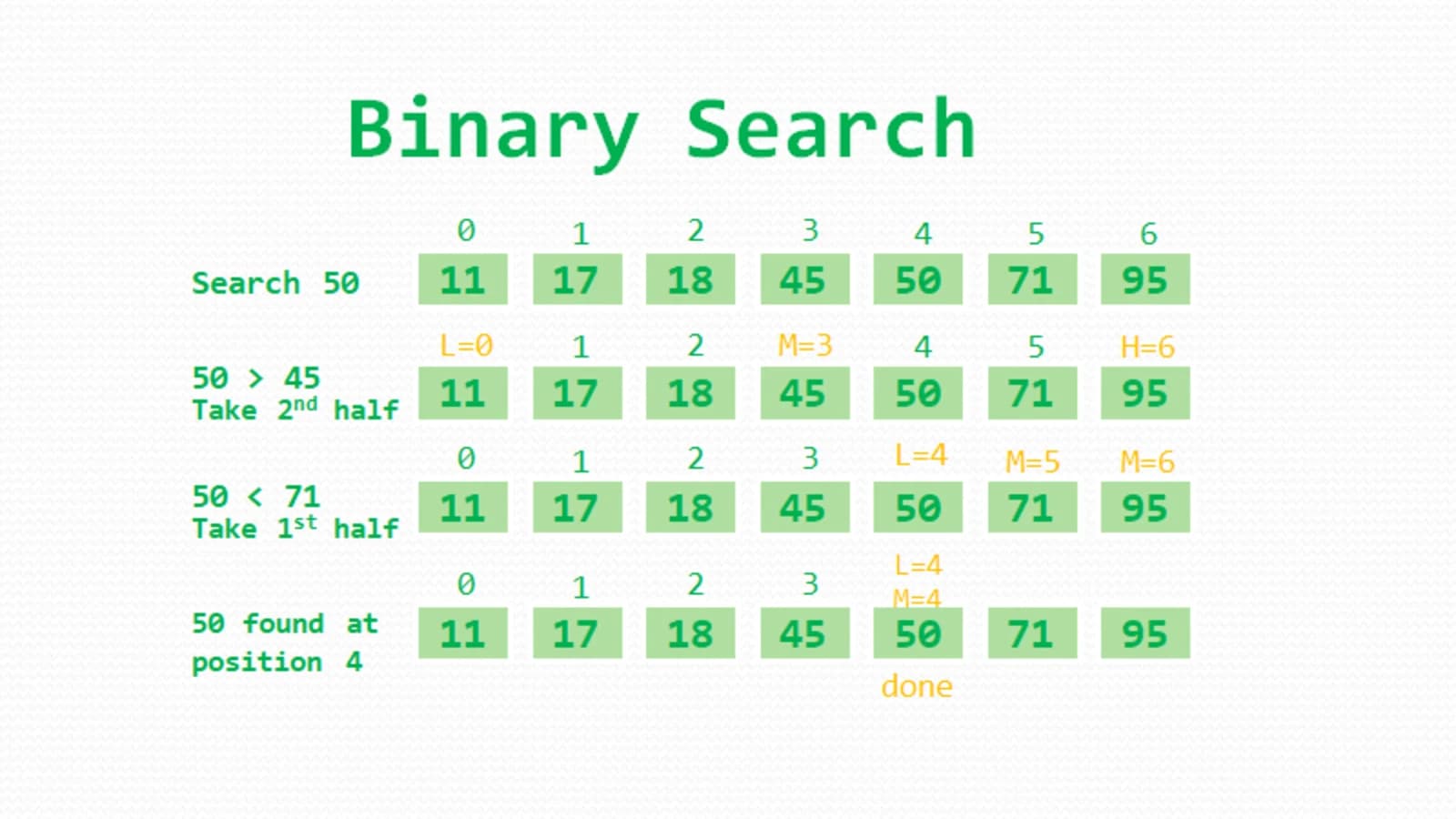
First Step: Calculate the mid and compare the mid element with the key. If the key is less than the mid element, move to the left and if it is greater than the mid then move search space to the right.

The key is less than the current mid-45. The search space moves to the left.
If the key matches the value of the mid element, the element is found, and stop search.
Let me break it down step by step:
Initialize a function called
binarySearchwith parametersarrthe array of integers,ngiven Array length,targettargeted valueconst binarySearch = (arr, n, target) => { }Initialize pointers for the start, end, and mid of the array
   let start = 0;
   let end = n - 1;
   let mid;
Perform the binary search using a while loop with the condition: if the start position number is greater than or equal to the end position then the loop will stop.
while (start <= end) {}Calculate the middle index of the current search space.
 //  while (start <= end) {
     mid = start + Math.floor((end - start) / 2);
 // }
Let's break down this
mid calculationformula step by step:Calculate the Range:
(end - start)represents the total number of elements in the current search space. For example, ifstartis 0 andendis 5, the range is 5 (inclusive of bothstartandend).Divide by 2:
(end - start) / 2calculates the half of the range, which gives the distance fromstartto the middle element. This division ensures that the result is an integer (thefloorfunction takes the integer part of the division).Add to Start: Finally,
start + Math.floor((end - start) / 2)add the calculated distance to the initial starting index (start). This gives the index of the middle element within the current search space.
Check if the middle element is equal to the target
 // while (start <= end) {
    // mid = start + Math.floor((end - start) / 2);

     if (arr[mid] === target) {
       // If found, return the index of the target
       return mid;
 // }
If the middle element is greater than the target then update the end pointer
 //  while (start <= end) {
     if (arr[mid] > target) {
       end = mid - 1;
     }
 // }
If the middle element is less than the target then update the start pointer
 //     if (arr[mid] > target) {
 //          end = mid - 1;
 //      }
         else {
           start = mid + 1;
         }
If the target is not found in the entire array, return -1 after the while loop end.
The complete implementation of the binary search algorithm in JavaScript.
 const binarySearch2 = (arr, n, target) => {
   // Initialize pointers for the start, end, and mid of the array
   let start = 0;
   let end = n - 1;
   let mid;

   // Perform binary search using a while loop
   while (start <= end) {
     // Calculate the middle index of the current search space
     mid = start + Math.floor((end - start) / 2);

     // Check if the middle element is equal to the target
     if (arr[mid] === target) {
       // If found, return the index of the target
       return mid;
     }

     // If the middle element is greater than the target, update the end pointer
     if (arr[mid] > target) {
       end = mid - 1;
     } else {
       // If the middle element is less than the target, update the start pointer
       start = mid + 1;
     }
   }

   // If the target is not found in the entire array, return -1
   return -1;
 }
Recursive Binary Search Algorithm:
Declares a function named
binarySearchthat takes an arrayarr,startandendindices of the search space, and atargetvalue to search for.const binarySearch = (arr, start, end, target) => { ... }Check if the search space is not empty. If it's empty (
end < start), the function returns -1 (indicating that the target is not found).if (end >= start) { ... }Calculates the middle index of the current search space
let mid = start + Math.floor((end - start) / 2)Check if the middle element is equal to the target. If so, the function returns the index (
mid) where the target is found.if (arr[mid] == target) { return mid; }Recursive Calls:
If the target is less than the middle element, it means the target is in the left half of the array.
if (arr[mid] > target) { return binarySearch2(arr, start, mid - 1, target); }If the target is greater than the middle element, it means the target is in the right half of the array. The function makes a recursive call on the right subarray.
else { return binarySearch2(arr, mid + 1, end, target); }
If the target is not found in the entire array, the function returns -1.
return -1;The complete implementation of the recursive binary search algorithm in JavaScript.
 const binarySearch2 = (arr, start, end, target) => {
   // Check if the search space is not empty
   if (end >= start) {
     // Calculate the middle index
     let mid = start + Math.floor((end - start) / 2);

     // Check if the middle element is the target
     if (arr[mid] == target) {
       return mid;  // If found, return the index
     }

     // If the target is in the left half, recursively search the left subarray
     if (arr[mid] > target) {
       return binarySearch2(arr, start, mid - 1, target);
     } else {
       // If the target is in the right half, recursively search the right subarray
       return binarySearch2(arr, mid + 1, end, target);
     }
   }

   // If the target is not found in the entire array, return -1
   return -1;
 };
Advantages of Binary Search:
Binary search is faster than linear search, making it particularly efficient for searching in large arrays.
Binary search outperforms other searching algorithms with similar time complexities, such as interpolation search or exponential search.
Binary search is well-suited for searching large datasets stored in external memory, like on a hard drive or in the cloud.
The algorithm's logarithmic time complexity ensures efficient searching by repeatedly halving the search space.